WebCT: Java and popup checks

Thu Nov 16 11:47:21 2006 EST (-0500 GMT)

Here’s a great posting to the WebCT Ask Dr. C forum. Apparently this person is not too impressed with WebCT CE 6:

Could you please add more checks for Java and popups? The 3 or 4 that I need to wait for when I log in really aren’t enough. And adding another Java/popup check every time I post to a discussion group still doesn’t do it for me. How do you know with so “few” checks that a user’s browser environment is really ready for the awesome capabilities of WebCT version 6 if you don’t check for Java and popup capabilities at least once every 30 seconds? In fact, checking every 15 seconds might even be better, because who knows how often these clever new browsers could change their capabilities, or be modified by users?

And he goes on at: http://discussions.webct.com/jive4/thread.jspa?messageID=88412

Mike and Mike

Thu Nov 9 19:23:02 2006 EST (-0500 GMT)

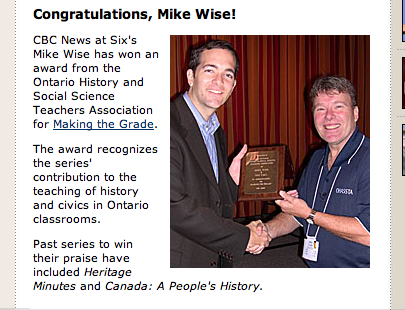
A Surreal experience:  I was watching the CBC news at six in Toronto and was curious about their blogs and such. I almost always have my laptop with me as I watch the news and I went over to CBC.ca/toronto and clicked on the news at six link, and there was my father half way down the page!
So congratulations Mike Wise for your award from OHSSTA and congratulations Mike Clare for making it to the CBC web site.

Mike Wise and Mike Clare
www.cbc.ca/newsatsixtoronto/

Take on Image Spam

Thu Nov 9 10:16:44 2006 EST (-0500 GMT)

HawkWings.net has a good write-up on MacInTouch reader Bill Benson’s rule for fighting image based spam. Basically, most of this image spam contains a heading Content-Type which contains multipart/related. You have to add the header to your rules in Mail.app, but that’s the only tough part. I would recommend you set the filter to change the background colour until you know everything is working.
www.hawkwings.net/2006/08/01/mailapp-rule-fix-for-image-spam/

SPAM!

Update: You may want to add something like “From” does not contain [email protected].

Don’t let the WMD hit you on the way out Rumsfeld!

Wed Nov 8 14:58:55 2006 EST (-0500 GMT)

George Bush just announced that the current CIA director will become the new secretary of defence.

Finally, an exit strategy.  The democrats are being greeted as liberators!
Last night’s US mid-term elections demonstrated that American’s wanted change. The Canadian equivalent of the shift in leadership in the US Senate and House would (loosely) be a parliamentary non-confidence vote. The number one issue this year was Iraq, and the Democrats have no real policy alternative or vision for the country – they just know when it’s best to just quietly slink away from something. Last nights results was punishment for the Republicans, it had little to do with the Democrats that won.
With that in mind, Bush has wisely gotten rid of Rumsfeld and responded to a desire for change. This likely has little to do with Rumi’s incompetence. Bush can (as of his press conference today at 1:00) dismiss last nights election results as a lessons learned and point to the action he took [….next question]. If only this was all happening four years ago.

My one other brief point on the US Mid-terms: When you see that gerrymandering that has gone on with the re-districting of senate and house districts in order to make incumbents almost unbeatable it demonstrates that the US is the last country that should trying to spread democracy. Now that Rumsfeld’s gone I suggest the troops be redeployed to start spreading democracy in a new gulf region: Texas and Florida.

November is NeoOffice month

Wed Nov 1 0:01:56 2006 EST (-0500 GMT)

NeoOfficeRecently NeoOffice released NeoOffice 2.0 in a final beta format. NeoOffice is a rebuild of OpenOffice.org for Mac OSX.

OpenOffice.org is an office suite that is being developed by the open source community, lead by Sun, that originally provided an office productivity suite to the free software based systems like Linux, Solaris and BSD. The initial offerings were not that great, and stability and compatibility were an issue. Today’s releases of open office for Linux are perfectly viable replacements for MS Office’s basics, and the actual “Writer” tool is about as good as MS Word.

 Use OpenOffice.orgThe latest versions or OpenOffice.org (also known as OOo or OO.o) are available for Linux, BSD and Windows, but the Mac version has previously required extra steps to run on OSX, NeoOffice offered an alternative, but it was very unstable and slow until this 2.0 release.

The OpenOffice suite has always had the option to open and save files in the MS Office Format, as well as it’s own format and the Open Document/Open Text standard.

NeoOffice’s PDF support is better than any other OSX options. The print export option that comes with OSX and the Adobe creator that plugs directly into MS Word are notoriously bad when it comes to identify and preserving hyper links. The standard “Save as PDF” option in the print menu simply doesn’t preserve hyper links. Adobe should be able to preserve hyper links but often does not. OpenOffice/NeoOffice’s export to PDF option does preserve hyper links and I’ve already mentioned that it opens MS Office (Word) files!
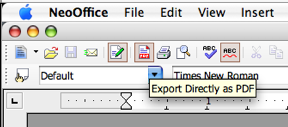
exportaspdf.png

This November is NeoOffice month for me because I plan on using nothing but OpenOffice/NeoOffice for the entire month. There is a small exception, if I have to demonstrate MS Office software at work I will, but I think it can be avoided.

OpenOffice/NeoOffice allows users to set the default file save type to the MS Office formats, which is what I do, but otherwise I’m swearing off MS’s software. The main reason for me is OpenOffice/NeoOffice can be installed at any time for free and if the computer/installation/software is at all ephemeral (temporary setup, an old machine, someone else’s computer) its not an issue. The ability to install it at any time and not have to remove it when I’m done (for licecning issues) OppenOffice/NeoOffice provides consistency.

Here’s hoping November will be a success.