PowerBook PowerBroke
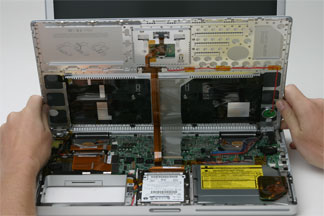
Thu Sep 8 19:07:50 2005 EDT (-0400 GMT)My fist dependent, my fist little one to care for, my poor little PowerBook. The problem started three weeks ago I was helping my parents try to fix their Linksys wireless routers problems (it was dying more than an unlucky Buddhist). I lost my connection to the new network I had setup and none of the normal WiFi network tools were allowing me to rejoin, so I restarted the computer ‚ or so I thought. It turned out to be a permanent shutdown.
All the machine would do was chime, it wouldn’t boot. I tired removing my extra RAM, I tried resetting the PRAM, I tried removing the battery, nothing would get it too boot. I ended up wasting 30 minutes at the Apple store in Yorkdale before I gave it to CPUsed. They tried the same things and determined that it was the logic board (the-everything-in-the-laptop-except-the-screen-keyboard-harddrive-CDROM-and-RAM part of the computer) and a new one would be $1200 CDN. The best part of this story is the fact that though the date this happened was just short of a year from when I received my PowerBook from the stork mail it was over a year from when I purchased it. One year from purchase is the length of Apple’s complimentary care for their products unless you buy the $300 Apple Care.
My PowerBook is a 1.33GHz G4 with a 60GB hard drive and a 15′ screen, you can buy a new 12′ iBook with the same specs for around $1200 (at least you can with the educational discount). I decided to plead my case to Apple, after all, I don’t think they want to be known for creating a laptop that falls victim to a restart after one year. He asked for a few minutes to update his records, I told him to take all the time he wanted, he took five.
 The next day I called Apple Canada Customer Support (who I think are based in Markham) and they were asking for CPUsed number to give them the One time warrantee exception and service code.
I had been using my PowerBook for work and was told to purchase one for work, but since the only person it impacted was me I had been putting it off. An hour after Apple agreed to do the right thing I put an order in for a new 12′ PowerBook…. With Apple Care.
This all left me without a computer so I took some time to setup the computer I was going to use as a MythTV box and setup a proper Linux desktop. I used Fedora Core 3 and KDE with my home folder NFS mounted on my 600GB server connected by a Gigabit Ethernet connection to my basement. My obsession with keeping backups paid off.
After about two weeks I heard back from CPUsed and made a special mid-week trip to Toronto to pickup the PowerBook. To be reunited with my loved one felt special, but the feeling was fleeting.
After two days I realized that whenever the machine was running and I unplugged the power source it would die. I could start it on bat or AC, I could add AC if I was running on bat, but if I was running on AC I couldn’t switch to bat. So once again, the machine was broken.
Again I called Apple Support, they suggested I reset the Power Management Unit (PMU) and over the phone we weren’t able to do it. So back to CPUsed the PowerBook went, but this time with the knowledge that the technician who was working on my PowerBook (because she was the only one certified to do it) was going back to “her country” for at least two weeks.
Another week passes and CPUsed said that resetting the PMU fixed the machine… well it does, for about 3 starts or so. I’m not quite sure what the scenario is, but the AC can be unplugged after the PMU is reset, but if it goes to sleep, gets recharged, or something like that, the unplug death returns. The best part is I’ll never be able to get a technician to acknowledge the problem because it takes a day of real use to bring it out.
So now I’m left with my machine needing to be shutdown to switch power sources. It’s broken, but not too broken. Still, I can’t wait for those Intel PowerBooks, hopefully Apple’s great OS can benefit from modern hardware to run on!
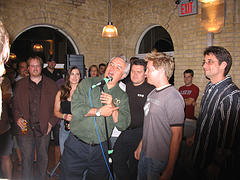 On Thursday before I left to go back down to St. Catharines I went the the TechTV Meetup at No Regrets Restaurant. It was really cool to see all those people there and all of the geek celebrities took time to talk to whomever was interested.