Google Talk & Adium
Thu Aug 25 9:46:55 2005 EDT (-0400 GMT)The best IM tool for the Mac (if not any OS) is Adium, but that may change with Google Talk.
The problem is, Google Talk is Windows only, for now, and though the website says Adium will connect to it, it does not say how — so I’m going to say how:
- Open Adium’s Prefrences
- Click the plus on the add accounts page and choose a Jabber account
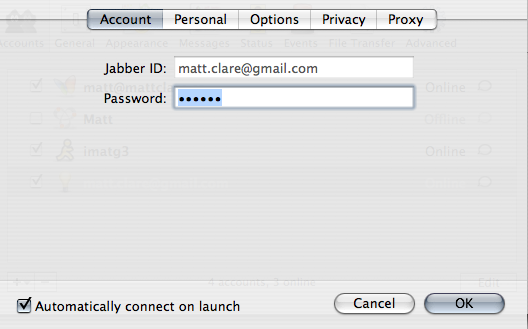
- Put in your GMail E-Mail address and your password in the Account tab
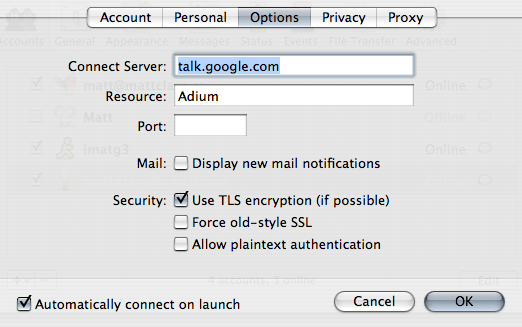
- Under the Options tab add the server of talk.google.com
- check off secure TLS –
and you might want to check the mail notification option - You might want to check auto-connect
- Hit OK and you’re done!
This entry was posted
on Thursday, August 25th, 2005 at 09:46 and is filed under *nix, General, Technology.
You can follow any responses to this entry through the RSS 2.0 feed.
Both comments and pings are currently closed.

